Messaging
Messaging allows to send messages between applications. Message queue, security, connections are managed by ProconTEL 4 platform. At the moment we use one message broker - Active MQ
Sending a message
 public interface IMessageBus
    {
        Task PublishAsync<TMessage>(TMessage message);

        Task PublishAsync<TMessage>(string routingId, TMessage message);

        Task<IEnumerable<AcknowledgementResult>> PublishWithAckAsync<TMessage>(TMessage message, CancellationToken cancellationToken = default);

        Task<IEnumerable<AcknowledgementResult>> PublishWithAckAsync<TMessage>(string routingId, TMessage message, CancellationToken cancellationToken = default);
    }
In order to send messages IMessageBus interface has been exposed. There are four ways of sending messages:
PublishAsync <TMessage>(TMessage message)allows to send message with a custom object<TMessage>. In this method<TMessage>object type is used as routingIdTask PublishAsync<TMessage>(string routingId, TMessage message)allows to overwrite defaultroutingIdwith a custom message type.Task<IEnumerable<AcknowledgementResult>> PublishWithAckAsync<TMessage>(TMessage message, CancellationToken cancellationToken = default);allows to send a message with acknowledgement and optional cancellation token. Returns a collection of acknowledgement results that include correlation id unique to each message and acknowledgement status.Task<IEnumerable<AcknowledgementResult>> PublishWithAckAsync<TMessage>(string routingId, TMessage message, CancellationToken cancellationToken = default)allows to send a message with acknowledgement, optional cancellation token and overwritten defaultroutingId. Returns a collection of acknowledgement results that include correlation id unique to each message and acknowledgement status.
By default, acknowledgement is awaited for 15s after which it is considered timed out. It is possible to modify the timeout in app settings: see Messaging preferences.
Message acknowledgement
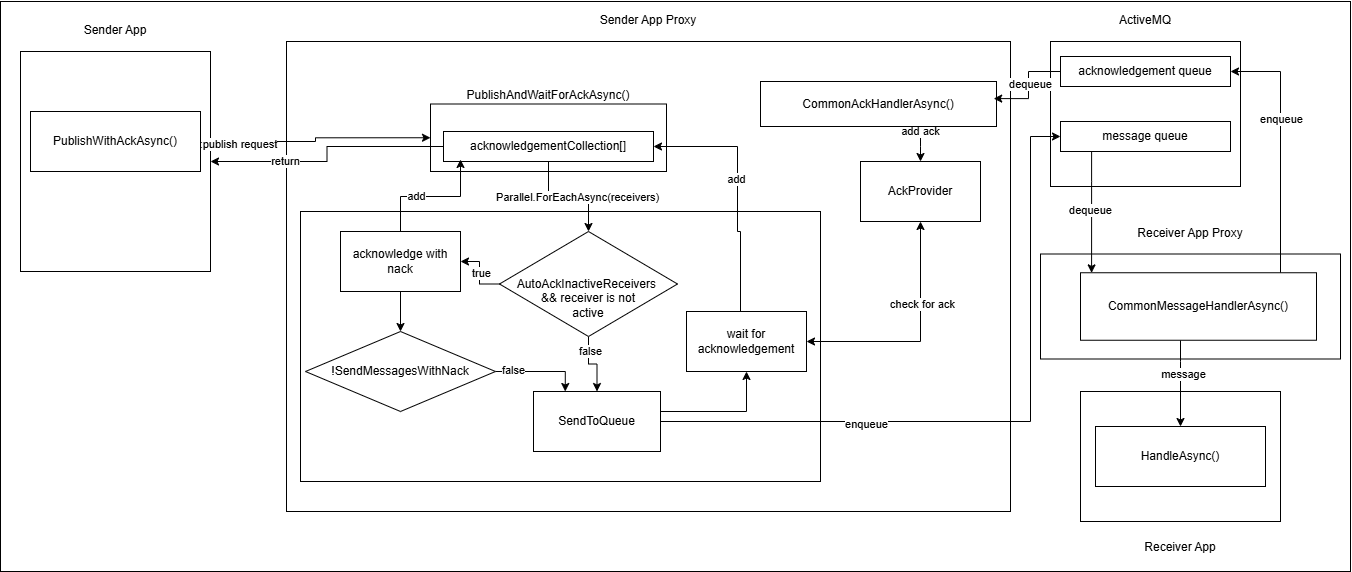
This is a diagram of how acknowledgement works in ProconTEL 4:
Receiving a message
When defining TMessage classes in Sender and Receiver remember about Namespace alignment for Sender and Receiver rule.
 public interface IMessageHandler<TMessage>
    {
        Task HandleAsync(TMessage message);
    }
In order to receive a message it's necessary to implement IMessageHandler interface. It handles message of custom type TMessage
The next step is registering your message handler.
await ProconTelApp.StartAsync(args,
    services =>
    {
        // Registers MyMessageHandler which handles all messages routed via MyMessage.
        // It ignores messages routed via custom routingId
        services.AddMessageHandler<MyMessageHandler, MyMessage>();

        // Registers MySecondMessageHandler which handles all messages routed via MessageTypeX001.
        // It handles messages of all types.
        services.AddMessageHandler<MySecondMessageHandler, MySecondMessage>().WithRoutingId("MessageTypeX001");
    });
Message Retries
The retry mechanism allows for automatic retries when sending messages using the Procontel SDK. This feature can be enabled by adding the retry configuration to the message handler registration. To enable the retry mechanism, use the WithRetries extension method when configuring the message handler. This method specifies the number of retries that should be attempted if sending the message fails.
The retry mechanism in utilizes an exponential backoff strategy when retrying failed message sending attempts. This strategy introduces a delay between each retry, increasing the delay duration exponentially with each subsequent retry. The exponential backoff strategy helps to prevent overwhelming the system with repeated failed attempts and provides a more efficient and scalable approach to retrying.
builder.Services.AddMessageHandler<MyMessageHandler, MyMessage>().WithRetries(5);
In this example, the message will be sent up to 6 times in total (1 initial attempt + 5 retries).
If the message is processed successfully before reaching the maximum retries, no additional retries will be performed.
To trigger a retry, an error should be thrown inside the message handler. This error will be caught by the retry mechanism, and the message will be resent according to the configured retry settings.
public class MyMessageHandler : IMessageHandler<MyMessage>
{
    public async Task HandleAsync(MyMessage message)
    {
        try
        {
            // Message handling logic
        }
        catch (Exception ex)
        {
            // Throw an error to trigger retry
            throw new Exception("Failed to send message", ex);
        }
    }
}
Namespace alignment for Sender and Receiver
Starting with ProconTEL SDK version 4.0.12, if a RoutingId is not specified, the class names for the Receiver and Sender applications must be identical for message routing. Additionally, both classes must reside in the same namespace. It's essential that both the Receiver and Sender are upgraded to use a version higher than 4.0.12.
Retry Configuration
The retry configuration can be customized according to your application's requirements. The WithRetries method accepts an integer parameter that represents the maximum number of retries.
0retries means the message will be sent only once.1retry means the message will be sent again if the initial attempt fails.Nretries means the message will be sent up toN+1times, including the initial attempt.
Examples
Using class name as routingId
1. Sending message
    public class ExampleMessageSender(IMessageBus messageBus)
    : IExampleMessageSender
    {
        public async void SendMessage()
        {
            await messageBus.PublishAsync(new MyMessage() {Id = 1, Name = "Test"});
        }
    }

    public class MyMessage
    {
        public int Id { get; set; }
        public string Name { get; set; }
    }
2. Receiving message
Message Handler:
internal class MyMessageHandler(ILogger<MyMessageHandler> logger)
: IMessageHandler<MyMessage>
{
    public Task HandleAsync(MyMessage message)
    {
        logger.LogInformation($"I have a message with id {message.Id}, name {message.Name}");
        return Task.CompletedTask;
    }
}
Message Handler Registration in program.cs:
await ProconTelApp.StartAsync(args,
    services =>
        services.AddMessageHandler<MyMessageHandler, MyMessage>();
    });
In this scenario, the message handler handles only messages without a custom routingId, with the same class name, residing in the same namespace as in the received message
Using Custom routingId
1. Sending message with custom routingId
    public class ExampleMessageSender(IMessageBus messageBus)
    : IExampleMessageSender
    {
        public async void SendMessage()
        {
            await messageBus.PublishAsync("MessageType001", new MyMessage() {Id = 1, Name = "Test"});
        }
    }

    public class MyMessage
    {
        public int Id { get; set; }
        public string Name { get; set; }
    }
2. Receiving message with custom routingId
Message Handler:
internal class MyMessageHandler(
    ILogger<MyMessageHandler> logger,
    IMessageContextAccessor messageContextAccessor)
    : IMessageHandler<MyMessage>
{
    public Task HandleAsync(MyMessage message)
    {
        var routingId = messageContextAccessor.MessageContext?.RoutingId;

        logger.LogInformation(
            "I have a message with id {Id}, name {Name}, routingId {RoutingId}",
            message.Id,
            message.Name,
            routingId);

        return Task.CompletedTask;
    }
}
ProconTel registers IMessageContextAccessor in dependency injection and provides it to message handlers.
You can inject this service into a handler to access the current MessageContext and identify the message RoutingId by using MessageContext?.RoutingId.
Message Handler Registration in Program.cs:
await ProconTelApp.StartAsync(args,
    services =>
        services.AddMessageHandler<MyMessageHandler, MyMessage>().WithRoutingId("MessageType001");
    });
Please note that you can use different class than MyMessage in the message handler. It's important that the fields in class are the same as the fields from received message.
It means that services.AddMessageHandler<MyMessageHandler, MyDifferentMessage>().WithRoutingId("MessageType001") also handles messages with class name MyMessage routed via MessageType001
Sending a message with acknowledgement
    public class ExampleMessageSender(IMessageBus messageBus)
    : IExampleMessageSender
    {
        public async void SendMessage()
        {
            var ackResults = await messageBus.PublishWithAckAsync("MessageType001", new MyMessage() {Id = 1, Name = "Test"});
            foreach (var ackResult in ackResults)
            {
                _logger.LogInformation($"Message with correlation id: {ackResult.CorrelationId} acknoweldged with status: {ackResult.Ack}.");
            }
        }
    }

    public class MyMessage
    {
        public int Id { get; set; }
        public string Name { get; set; }
    }
Adding custom JsonSerializerOptions
Starting from ProconTel.SDK version 4.0.27, an optional parameter jsonSerializerOptions was added to the ConfigureProconTel method. This allows for adding custom JsonSerializerOptions that will be used during messaging.
builder.WebHost.ConfigureProconTel(builder.Configuration, new JsonSerializerOptions
{
    WriteIndented = true,
    Converters = { new TypeJsonConverter() }
});
JsonSerializerOptions can be accessed by JsonSerializerOptionsRegistration.JsonSerializerOptions property.
Messaging client timeout
It is possible to configure HttpClient.Timeout for the messaging client. This modifies the timeout for publishing http request. This can specifically be useful if Acknowledgement Timeout Acknowledgement Timeout is configured to be more than 100 seconds. With the default HttpClient.Timeout of 100s, PublishWithAckAsync runs into this timeout first making Acknowledgement Timeout essentially not take effect, so messagingClientTimeoutSeconds might need to be adjusted in this case:
builder.Services.AddProconTel(builder.Configuration, messagingClientTimeoutSeconds: 180);