Distributed tracing
ProconTEL supports passing basic tracing properties by using Activity class.
Properties that are passed:
ParentIdTraceIdSpanIdTags
This information is passed through the entire call chain - even if it interacts with another application via message bus.
This means that if you create new Activity or modify the current one before sending a message, then receiver Activity will also be modified.
Reading Activity properties
var parentId = Activity.Current.ParentId;
var traceId = Activity.Current.TraceId;
var spanId = Activity.Current.SpanId;
var tags = Activity.Current.Tags;
Adding tags
Activity.Current.SetTag("key", "value");
Creating new Activity
var activity = new Activity("MyCustomActivity");
activity.SetParentId(
    ActivityTraceId.CreateFromString("01234567890123456789012345678901"),
    ActivitySpanId.CreateFromString("0123456789012345"));

activity.Start();
Structured logging fields
All of these Activity specific properties will be added as fields to structured logging.
This means that every log message that is sent using ILogger will have all the fields from the current Activity added:
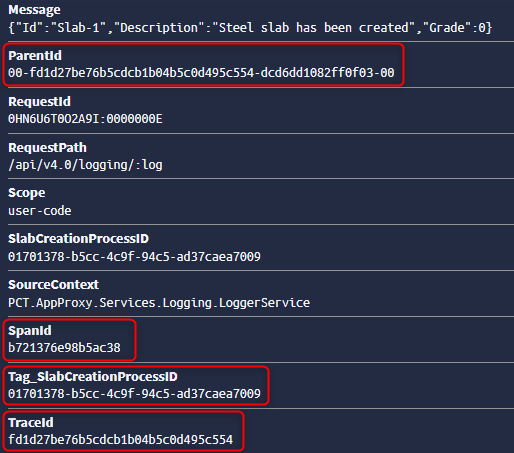
Example
Sender
[HttpPost("startSlabCreationProcess")]
public async Task StartSlabCreationProcessAsync()
{
    Activity.Current.SetTag("SlabCreationProcessID", Guid.NewGuid().ToString());

    var slab = _slabCreatorService.CreateSlab();
    _logger.LogInformation("Creating a new steel slab {Slab}", slab);
    await _messageBus.PublishAsync("MessageTypeX001", slab);
}
Receiver
public async Task HandleAsync(SlabCreatedMessage message)
{
    var guid = Activity.Current.GetTagItem("SlabCreationProcessID");
    _logger.LogWarning("Message received {@Message}, SlabCreationProcessID: {SlabCreationProcessID}", message, guid);
    await Task.CompletedTask;
}
In Receiver app you will see the same Activity Tag as set in Sender app.