Keycloak Configuration
By default, ProconTEL 4 is using the internal identity server with self-hosted database. But it is possible to configure Keycloak as external identity provider. This section provides detailed information about configuring Keycloak server in ProconTEL 4.
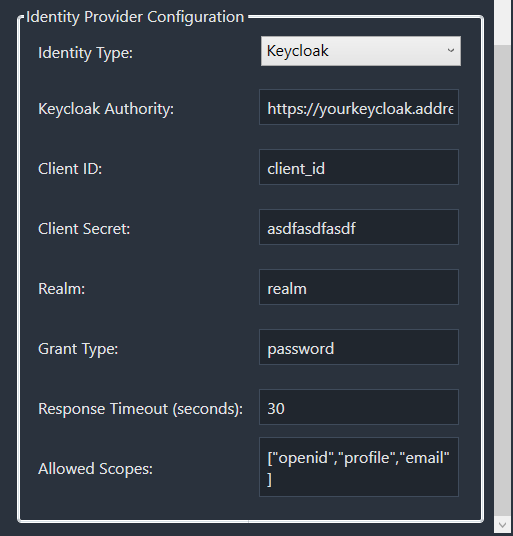
Configuration Options
The following configuration options are available in the Keycloak Configuration section:
Keycloak Authority
- The base URL of your Keycloak server
- Example:
https://keycloak.example.com/auth
Client ID
- The client identifier registered in Keycloak
- This is the unique identifier for your application in Keycloak
Client Secret
- The secret key associated with your client ID
- Used for secure communication between your application and Keycloak
Realm
- The Keycloak realm name where your client is configured
- Example:
masteror your custom realm name
Grant Type
- The OAuth 2.0 grant type to be used
- Common values include:
authorization_code,client_credentials, etc.
Response Timeout (seconds)
- The maximum time in seconds to wait for a response from Keycloak
- Default value is typically 30 seconds
Allowed Scopes
- A list of OAuth scopes that your application requires
- Enter one scope per line
- Common scopes include:
openid,profile,email, etc.
Configuration Steps
- Select "Keycloak" as the Identity Type in the Identity Configuration section.
- Fill in all required Keycloak configuration fields.
- Ensure the Allowed Scopes match those configured in your Keycloak client.
- Save the configuration.
caution
After saving the changes, the IdentityServer service will be restarted. This will cause all logged in users to be logged out after about 30 seconds.