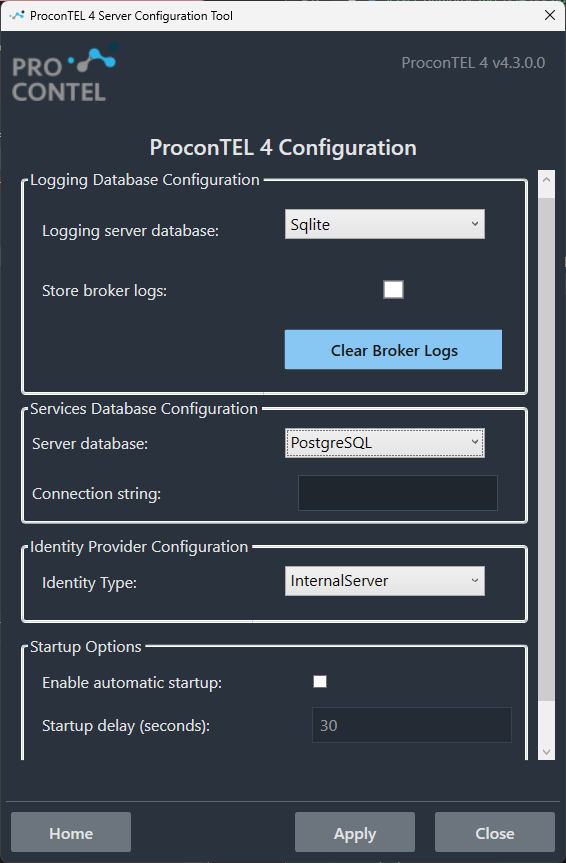
Server Database Configuration
The Server Database Configuration section allows you to change the database provider for an existing application installation. It supports the same database providers and configuration requirements as the installer.
The application supports the following database providers:
- PostgreSQL (default) – Requires a single connection string. Example connection string:
Host=localhost;Port=5433;Database=postgres;Username=postgres;Password=postgres;. - Microsoft SQL Server (MSSQL) – Requires a single connection string. Example connection string:
Server=localhost;Database=db;User Id=user;Password=pass;Encrypt=True;. - Oracle – Requires four separate database users, one for each application service. Each service must be configured with its own dedicated database user and credentials. Example connection string:
User Id=user;Password=pass;Data Source=localhost:1521/XE;. - MySQL – Requires four separate databases, with each application service using its own dedicated database. Example connection string:
Server=localhost;Port=3306;Database=db;User=root;Password=pass;. - SQLite – Supported for development and testing purposes only. It is not recommended for production environments. When selected, the database files are automatically created in
%ProgramData%\Macrix.
When you click Apply, the tool validates the provided database configuration by verifying the connection to the configured database(s). The new settings are saved only if all required connections can be successfully established.