Upgrade
The upgrade command supports both Kubernetes and Native/Windows environments.
The upgrade command changes application template revisions. By default, it upgrades matching applications to the latest available revision. When --revision is provided, it changes matching applications to the requested revision version, including downgrade scenarios.
pct upgrade [-a|--alias <app-alias>] [-t|--template <template-alias>] [-w|--workspace <workspace-name>] [-s|--scope <scope>] [-r|--revision <revision>] [--rollback|-rol <true|false>] [--comment|-c <comment>]
- -a/--alias: Optional application alias. Limits the operation to one application.
- -t/--template: Optional app template alias. Limits the operation to applications created from the specified template.
- -w/--workspace: Optional workspace name (sent to the coordinator as
workspaceName). Limits the operation to applications in workspaces with that exact name (equality match; case sensitivity depends on the database). - -s/--scope: Optional upgrade scope. Supported values:
stopped-apps,running-apps,all-apps. - -r/--revision: Optional target revision version (must be greater than 0 when set). When omitted, the latest available revision is used. When provided, the command can also downgrade applications.
- --rollback/-rol: Optional; coordinator-only. Default:
false. Applies when the upgrade path includes stop → change revision → start (default no-scope,all-apps,running-apps); it does not apply tostopped-appsalone, which does not stop running apps. Whentrue, after that flow the coordinator checks that restarted apps report Running; if not, it may revert template revisions and then start again all applications that were running before the upgrade. - -c/--comment: Log additional message on the coordinator logs on start of upgrade process. The message will be logged with a prefix: "The upgrade process triggered with additional comment: "
- Alias and template alias: Lowercase letters, digits, and hyphens only; maximum length 40 characters.
- Revision: If you pass
--revision, it must be a positive integer (> 0).
Scope behavior
stopped-apps: Changes revision only for matching stopped applications (not in Initializing, Starting, Running, or Stopping). No stop/start orchestration for running apps.running-apps: Changes revision for apps in status Initializing, Starting, Running, or Stopping status. The coordinator runs stop → change revision → start for those apps (on both Kubernetes and Native/Windows).all-apps: Changes revision for all matched applications, then starts only the apps that were running before the operation. Uses the same stop → change revision → start orchestration on both Kubernetes and Native/Windows when there are running targets.
Default (omit --scope) uses the same coordinator stop → change revision → start flow as all-apps for matched applications on both Kubernetes and Native/Windows.
Restart behavior
When the scope is omitted, all-apps, or running-apps, applications that were stopped for upgrade are started in logical order. First are starting applications that have configured automatic start up then apps ordered by alias.
CLI output and exit codes
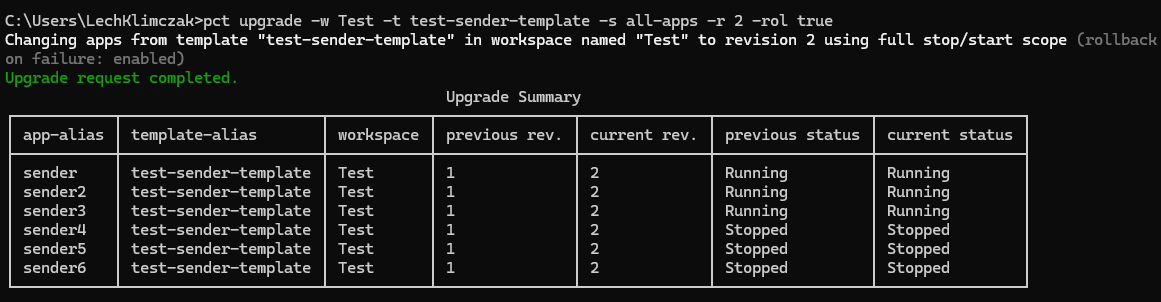
After each run, the CLI prints a status line and an Upgrade Summary table. The table compares previous and current template revision as read from the coordinator (not merely the values you typed).
Status line:
- Green — Upgrade request completed. when the coordinator reports full success (
revisionChangedSuccessfullytrue) and there is no yellow rollback-only message. - Yellow — Coordinator
messagewhen not all targeted apps were updated to the requested revision (for example the revision does not exist on the template). - Red — Error text for HTTP/network failures or coordinator error responses.
On red errors or the partial revision yellow case, exit code is 1; on full success (including yellow rollback info with success) it is 0. Detailed errors are logged on the coordinator side.
Examples:
Upgrade applications using the default behavior:
pct upgradeUpgrade a specific application:
pct upgrade --alias app-nameUpgrade applications from one template only:
pct upgrade --template template-nameUpgrade applications to a specific workspace template only:
pct upgrade --workspace Test --template template-nameUpgrade only stopped applications:
pct upgrade --scope stopped-appsUpgrade only running applications:
pct upgrade --scope running-appsUpgrade applications from one template to a specific revision:
pct upgrade --template template-name --revision 2Change revision for running applications from one template:
pct upgrade --template template-name --scope running-apps --revision 3Upgrade applications using the default behavior and log additional comment:
pct upgrade --comment "additional comment"