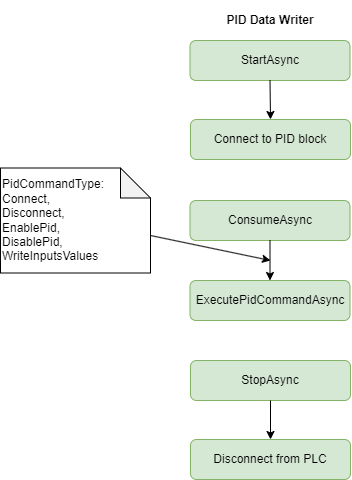
PID Data Writer
This section describes the PidDataWriter. Module can be used in any application hosted in the ProconTEL 4 environment which is using components pipeline builder. The PID Data Writer allows the application to write information to the PID block.
The extension method AddS7PidDataWriter allows a user to create a application that will write PidData to S7-1200 and S7-1500 PLCs families. However, it is required to add the MxPidCommunication function block to the PLC program. For details read the instruction: How to prepare the PLC
Definition
Namespace: ProconTel.Components.Communication.PidCommunication
Assembly: ProconTel.Components.Communication.PidCommunication.dll
Module Instalation
To install a PidDataWriter module into project, Nuget Package Manager Console can be used:
Install-Package ProconTel.Components.Communication.PidCommunication -ProjectName <ProjectName>
Nuget package can be found in the repository: https://nexus.macrix.eu/repository/pct2022/
Available Pipeline extensions and configuration methods
The module provides two extensions method that allows to inject PidDataWriter module support to application.
public static PidConnectionSyntax AddS7PidDataWriter(
    this PipelineBootstrapper bootstrapper,
    string plcIpAddress,
    int communicationDataBlockNumber,
    TimeSpan delayOfCyclicDataRead,
    TimeSpan delayOfResetWriteFlag)
public static PidConnectionSyntax AddS7PidDataWriter(
    this PipelineBootstrapper bootstrapper,
    Action<S7ConnectionSettings> configuration)
S7ConnectionSettings contains a number of parameters that can be passed when needed. Note that PlcIpAddress doesn't include the default value. Therefore this value has to be set by the user. The table below describes all available parameters and default values:
| ParameterName | Default | Description |
|---|---|---|
| PlcIpAddress | null | The IP address of the PLC device. |
| CommunicationDataBlockNumber | 2000 | The number of the communication data block in TIA Portal. Check the details below. |
| DelayOfCyclicDataRead | 100 [ms] | The delay for the cyclic read. |
| DelayOfResetWriteFlag | 100 [ms] | The delay time after each write data execution. |
| AutomaticReconnectEnabled | true | Enabling auto reconnect mechanism. |
| Cpu | S71500 | The Siemens CPU type. |
| Rack | 0 | The PLC rack number. |
| Slot | 1 | The PLC slot number. |
| InputsStartByteAdr | 0 | Start byte address in the communication data block for input values. |
| OutputsStartByteAdr | 32 | Start byte address in the communication data block for outputs values. |
Example of usage
This example shows the usage of the PidDataWriter. The module opens a connection to the PID block and writes values.
First, register the PidDataWriter in the Program.cs class.
await ProconTelApp.StartAsync(args, (services, configuration) => services.AddPipeline(pipeline =>
{
    var config = new S7ConnectionSettings();
    configuration.Bind("S7PidConfig", config);

    services.AddMessageHandler<MessageBusProducer, SendCommandData>()
    .WithRoutingId("*");
    services.AddPipeline(pipeline =>
    {
        pipeline.SetId("messageBus_to_pid");
        pipeline.AddS7PidDataWriter(config.PlcIpAddress!,
        config.CommunicationDataBlockNumber,
        config.DelayOfCyclicDataRead,
        config.DelayOfResetWriteFlag);
    });
}));
Add the most important connection parameters to appsettings.
"S7PidConfig": {
    "PlcIpAddress": "127.0.0.1",
    "CommunicationDataBlockNumber": "2000",
  }
Note that PlcIpAddress and CommunicationDataBlockNumber must match the actual values set in your PLC. For details read the instruction: How to prepare the PLC
Add a producer implementation that will send data to the PID block.
internal sealed class MessageBusProducer : IMessageHandler<SendCommandData>
{
    private readonly ILogger<MessageBusProducer> _logger;
    private readonly IMessageContextAccessor _messageContextAccessor;
    private readonly IPipelineBus<SendCommandData> _pipelineBus;

    public MessageBusProducer(ILogger<MessageBusProducer> logger,
    IMessageContextAccessor messageContextAccessor,
    IPipelineBus<SendCommandData> pipelineBus)
    {
        _logger = logger;
        _messageContextAccessor = messageContextAccessor;
        _pipelineBus = pipelineBus;
    }

    public async Task HandleAsync(SendCommandData message)
    {
        var routingId = _messageContextAccessor.MessageContext?.RoutingId;

        if (message != null)
        {
            await _pipelineBus.ProduceAsync("messageBus_to_pid", message);
            _logger.LogDebug($"Message: {nameof(SendCommandData)} injected into the pipeline.");
        }
    }
}
The complete example can be found in the following link: Example of the PID data reader
Data exchange diagram