TCP/IP Communication Module
TCP/IP Communication Module
TCP/IP communication module can be used in any application hosted in the ProconTEL 4 environment which is using components pipeline builder.
Table of Contents
Protocol description
TCP/IP (Transmission Control Protocol/Internet Protocol) is a suite of communication protocols that enable communication between devices over the internet. TCP provides reliable, ordered, and error-checked delivery of data, while IP handles the routing of data between devices. In a TCP/IP communication, data is broken up into packets, which are then transmitted across a network.
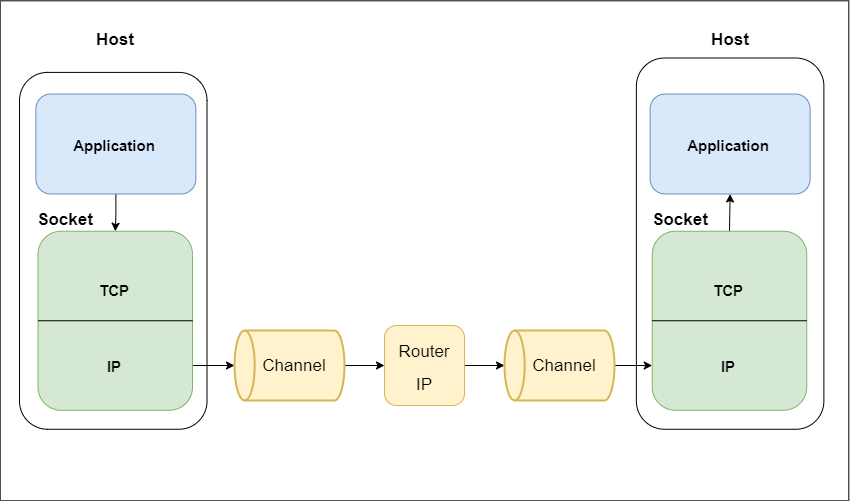
Each packet contains a header with information such as the source and destination addresses, the sequence number, and the length of the data. TCP ensures that packets are transmitted in the correct order and that any lost or corrupted packets are retransmitted. It also manages flow control to prevent the receiver from being overwhelmed with too much data too quickly.
In TCP/IP communication, a socket is a software endpoint that enables two-way communication between two devices over a network. A socket consists of an IP address and a port number, which together uniquely identify the communication channel. When a client device wants to communicate with a server device, it establishes a socket connection with the server by specifying the server's IP address and port number. The server then creates a new socket to handle the communication with the client. Once the socket connection is established, data can be transmitted between the two devices in both directions. The TCP protocol ensures that data is transmitted reliably and in the correct order, while the IP protocol handles the routing of the data between devices.
Definition
Namespace: ProconTel.Components.Communication.Tcp
Assembly: ProconTel.Components.Communication.Tcp.dll
Module Installation
To install a TCP/IP communication module into project, Nuget Package Manager Console can be used:
Install-Package ProconTel.Components.Communication.Tcp -ProjectName <ProjectName>
Nuget package can be found in the repository: https://nexus.macrix.eu/repository/pct2022/
Available Pipeline extensions and configuration methods
The module provides three extensions methods that allows inject TCP/IP communication protocol support to application.
AddTcpServer, allows application establish connection as TCP server and listen for incoming connections from external clients.
public static TcpConnectionSyntax AddTcpServer(this PipelineBootstrapper bootstrapper, Action<TcpConnectionOptions> configuration)
The server is available at the IP address on which the application is running.
OpenTcpConnection allows application to connect the server/servers as a TCP Client.
public static TcpConnectionSyntax AddTcpClient(this PipelineBootstrapper bootstrapper, Action<TcpConnectionOptions> configuration)
All configuration options can be set in TcpConnectionOptions object which is passed as action argument to extension methods. All Configuration parameter can be found here.
After selecting the connection type, it is necessary to configure the header settings in order to properly process incoming messages.
public PipelineConfiguration WithHeader(Action<TelegramHeaderDefinition> headerConfigurer)
More information about header definition file can be found here.
Data handling
Tcp module in terms of pipeline is a producer and consumer at the same time.
More information about pipeline structure used in componetns modules can be found here
User is able to set a type of data which Tcp module will be producing or which Tcp module can consume. There are three type of data that TCP module can handle currently:
- ByteArray => byte[]
- String => string with encoding specified by the user
- Xml => XDocument
To set the produced or consumed data type there are special parameter in tcp configuration:
...
opts.ProducerType = ProconTel.Components.Communication.BinaryStreamHandler.Common.BinaryStreamHandlerType.Xml;
opts.ConsumerType = ProconTel.Components.Communication.BinaryStreamHandler.Common.BinaryStreamHandlerType.Xml;
...
Example of usage in code
This example shows usage of module as a TCP/IP server in Producer mode. Created server listens for connections on port 1135. The length of the message is described in first two bytes of message, and message ID is described in next two.
After receiving the entire message, byte array is passed to the pipeline and consumed by MyBinaryHandler.
builder.Services.AddPipeline(pipeline =>
             pipeline.AddTcpServer(opts =>
             {
                 opts.Server.PortNumber = 1111;
                 ...
             }).WithHeader(header =>
             {
                 header.LengthFieldOffset = 0;
                 header.LengthFieldSize = 2;
                 header.IdFieldOffset = 2;
                 header.IdFieldSize = 2;
             }));